AI Research Assistant: Sources of Information (2/5)

In the second part of this series I will cover which sources of information can be fed into an AI assistant setup. In this part I cover how to set these up and connect them with each other, and in the next post how to connect them to your AI assistant.
In a way this post can stand alone, covering only sources of information and how to manage them (whether or not you’re using AI) and in the next post I will cover the AI-specific parts. While I will point out alternatives to the software I use, if I am aware of alternatives, I will focus on how these pieces fit together with the software I use as I can’t cover all possible variations. In addition to what I describe a simple text editor will also be useful (e.g. I use Zed but something like Windows Notepad would do). But, at first we need to establish what sources of information are relevant.
As academics our primary source of information is the academic literature. We always have new papers to read and a reading list so long we will never cover it. Not only that, each and every one of us has probably read more papers than they remember and can actively draw on themselves. That is very human. But, even if we cannot directly recall every part of what we’ve read, what we’ve read (and of course what we’ve learned) shapes our thinking. However, we cannot hope that feeding those same papers to an AI results in it generating output that is aligned with our thinking. If we wanted to achieve that we need a more personal form of knowledge and what I mean by that are your notes. Many of us take notes when reading a paper, listening to a talk, or when going about our daily work. These notes contain our points of view, our appraisal of someone’s work, what you’re currently working on and more. An AI that can draw upon these will thus be able to generate answers based on those. Thus, for an AI to be useful to us it needs access to both the information in the literature we built our work on and the personal knowledge in our notes. And both ways of structuring information I outline below will not only enable you to easily feed them into an AI, they will also make it easier for you to find relevant information without AI. That prompts the question: how do we provide access to this information to an AI? The answer to this consists of three parts: information management (reference management), personal knowledge management, and how to connect them.
Information Management (Reference Management)
The first part of that is access to the literature we’ve built our work on. This is not as easy as pointing an AI at an academic database because if we give the AI access to an academic database then this database is no longer a curated source of information and it is this curation that adds value. We can of course upload a bunch of PDFs but that risks overloading the AI’s context window (the amount of text a model can process in a single request). A practical answer to this conundrum is to use a reference manager such as Zotero (my recommendation), EndNote, or Mendeley. These reference managers allow us to structure our collection of sources and to curate which sources are included. Thus it is useful to both us and our AIs. When using the reference managers it is important that these are not only used for references based on metadata, but that they contain the full text PDFs of each source. These references then need to be meaningfully sorted, in this case, in a way that is meaningful to you. For example, in my case I have folders for self-regulated learning and mind wandering and within each of those multiple subfolders depending on source category. An AI will later be able to query both on storage location and metadata. Thus, the more sorted your work is and the better quality the metadata provided, the easier an AI will be able to find the relevant papers.
Personal Knowledge Management
Once we have organised our literature, the next step is to organise our notes in what is called Personal Knowledge Management (PKM). PKM refers to a system of capturing, organising, retrieving, and synthesising knowledge relevant to you. Capturing could be writing a note about a paper, organising would be to provide it metadata and tags that fit into your organisational system (again, something that makes sense to you). Retrieving is, as the name suggests, being able to find that knowledge again, usually based on how you organised it. Lastly, synthesis refers to compiling the organised information into new work, in our case usually writing or new ideas.
There are multiple methods for doing PKM, a famous one you might have heard about is the Zettelkasten by Luhmann. I will not go into the details of various methods as the details for this are out of scope for this series. I will, however, cover the relevant parts for how a PKM can be integrated into an AI setup. These are machine readability, which software to use, version control, metadata, and file organisation.
Machine Readability
The first part of a PKM to cover is machine readability. Machine readability refers, as the name suggests, to formats that are easily readable by a machine, as AIs are machines. PDFs do not fall in this category and when you upload a PDF to an AI this gets converted to machine-readable content in the background. The point of machine readability is closely linked to the software you use for your notes and your future (or existing) PKM. Popular note-taking software includes things like OneNote, Apple Notes, or just Word files in a folder. These are not examples of software that stores its content in a machine-readable format. There also is a variety of software available for PKM with popular examples being Obsidian (what I use), Logseq, and Notion. A decisive point of difference is how this software stores information. Something like Notion is cloud software where the content is not easily accessible for an external machine while Obsidian and Logseq store their data in plain text Markdown files. Markdown is a plain text format used to indicate in plain text files how text is structured in terms of headings; additionally, formatting such as bold or italics can be specified. There are various flavours of Markdown, such as CommonMark or GitHub Flavored Markdown that can be used for our purpose. Markdown is in essence nothing but plain text and an AI can always easily read Markdown text, in fact, it is a common format that AIs use in their answers. That means that a PKM that stores its knowledge in Markdown files (.md file extension) is not only easily readable by a human but also easily readable by an AI, perfect for our aim of a local setup that feeds our notes into an AI.
Software
Having the requirement in place that the notes in our PKM need to be machine-readable files severely limits our choice of PKM or note-taking software. Popular options such as OneNote or Notion store our notes in their cloud services or proprietary formats. Nevertheless, we still have some options when it comes to a local-first PKM software that supports Markdown. Options that I am aware of are Obsidian, Logseq, Joplin, and Zettlr. I am using Obsidian and chose it for its huge and active community, but you should be able to do most, if not all, of what I’m going to outline in this series with either of those options. Another advantage of Obsidian, tied to its active community, is that there are lots of plugins available that you can use to customise Obsidian to your liking. Should you be interested in those, a great outline of useful plugins is available, although some of those might be a bit much if you’re just getting started.
Before moving on, a brief tip. If you’re planning on converting Word files into markdown for inclusion in your vault and those Word files contains citations managed by a reference manager, then have a look at the guide from Better BibTeX for Zotero on how to preserve those citations in markdown.
Version Control
Following from picking a software for PKM, the next step is version control. You might be used to adjusting file names with a suffix in a pattern like filename_v4.docx or something along those lines and that is not what I mean here. What I mean is specialised version control software such as Git. This sort of software was originally developed for software development, but given that our notes are plain text, the same sort of software will also work well for our purposes. A full explanation of how version control software works is out of scope for this post but the main points that are relevant for our context are that it allows you to basically take a snapshot of the current state of your notes that is time-stamped and then push that current state to a remote storage location. A popular remote for version control is GitHub but if you choose that make sure to configure your repository to be private, otherwise your private notes will be visible to everyone. Having our notes version controlled comes with various advantages but the main one is that you can go back in time to previous versions should you need to, which is especially useful when the AI you use produces errors, and that is inevitable, all AIs produce errors at some point, and then having access to the previous versions allows you to easily undo all changes the AI made. Imagine working on a grant application and the AI adds a factual error or generates irrelevant output, with version control in place you can easily and quickly revert. Should you want to use version control with Git from within Obsidian, there is a plugin available for that purpose. Lastly, if you choose to use a different remote than GitHub, make sure you have enough space. To give you a frame of reference, I’ve been doing this for 4 years now and my notes folder is about 1GB in size.
Metadata
Now that we have a format that an AI can read and software to manage these notes, the next question is what it reads. The main part of these notes will of course be the content resulting from your work, but it needs to be able to find this content first. This is where metadata comes into play. Metadata is data about data, in this case data about your notes. This could look like (following the Obsidian convention of metadata as properties), where metadata is stored at the top of a file in a format called YAML (a simple, human-readable key-value format):
type: journal-article
source: Metacognition and Learning
authors: Daniel Ebbert, Negin Mirriahi, Natasha Wilson, Malgorzata Korolkiewicz, Nicholas Fewster-Young, Anna Lloyd, Maurizio Costabile, Srecko Joksimovic, Shane Dawson
year: 2026
title: Mind Wandering in Video-Based Learning: Self-Regulated Learning and Student Responses in a Naturalistic Setting
citekey: @ebbertMindWanderingVideoBased2026
tags: #self-regulation #mind-wandering
These metadata will allow an AI, and you (see the retrieval aspect of PKM) to find the relevant information. Want to get the notes related to the person Daniel Ebbert? Query by the name. Want to find all sources related to mind wandering? Query by the tags. What exact metadata you enter will depend on your use case and the information you want in your PKM, but if your notes are about literature you’ve read I recommend to at least cover the title of the source, who wrote it, when it was published and where, along with some tags so that you can find it more easily later.
Organisation
Next, similar to how you sorted your literature into folders, your notes also need to be sorted. For example, I have one folder for my daily notes, another for my grant applications, another for my publications, another for each talk I’ve given, another for my literature notes, another for the reviews I’ve written, and so on, you get the picture. The specific folders used here are less important than that they make sense to you and serve a specific purpose. Clearly distinct folder organisation is beneficial here as then an AI, and you, can search for specific information within specific folders. For example, me asking my AI to summarise the main reasons why my submissions were rejected can then be answered by the AI querying for the type: peer-review metadata in combination with filtering on the folder that contains the full texts and reviews of my publications.
Information Matching
Once you have both your reference manager and your PKM set up the next step is to connect them so that the sources in your reference manager can be matched to your notes in the PKM. Both directions of connection can be established and in the following I will showcase how to accomplish this using Zotero and Obsidian.
Citekeys
The challenge when matching information between systems is that a common identifier is needed, in this case for sources we have read and written notes about. For this purpose we will be using citekeys from BibTeX. BibTeX refers to a file format (.bib) for bibliographic information, such as journal articles or conference proceedings. In this file format each entry is assigned a unique identifier called a citekey. Then, when writing (originally this was designed for LaTeX) an author can refer to a piece of work by its citekey, for example @ebbertMindWanderingVideoBased2026 refers to the paper in the metadata example above. Although the citekey construction is arbitrary, it is useful if it contains the name of the first author and the year, but don’t worry, this can be automated. For the purpose of connecting Zotero and Obsidian we’re going to start with a Zotero plugin called Better BibTeX. Once you have this plugin installed in Zotero it will automatically generate citekeys for everything you have stored in Zotero. Furthermore, it allows you to export your entire library as a .bib file, making it machine-readable so that it can be picked up in Obsidian.
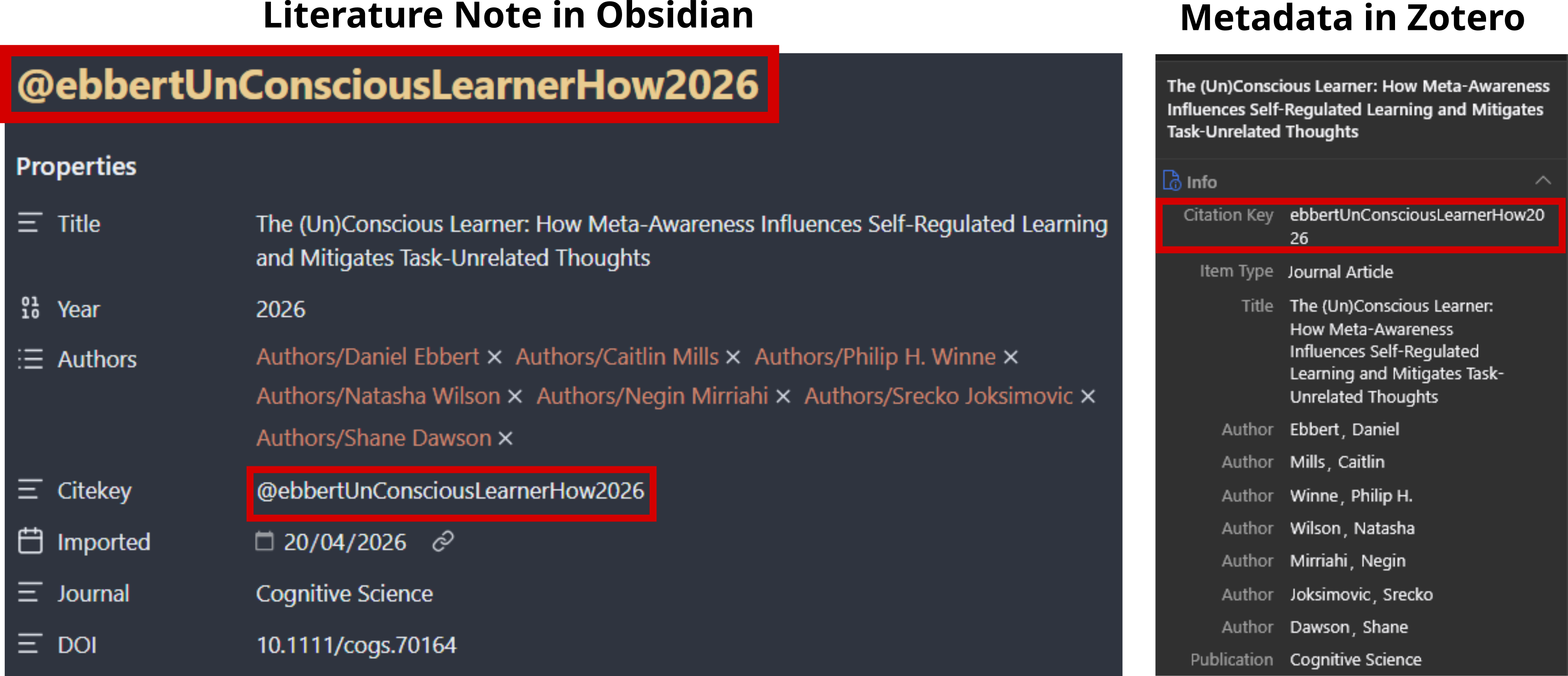
Citekeys in Zotero and Obsidian enable matching sources to notes.
Zotero -> Obsidian
With the Better BibTeX plugin in place we can move on to setting up literature notes in Obsidian based on sources we have stored in Zotero. This can be accomplished using an Obsidian plugin for this purpose. This plugin allows for the creation of literature notes in Obsidian based on metadata, notes, and PDF annotations from Zotero. It creates such a note based on a template for this purpose. I recommend you customise this template to your liking based on the documentation and examples from the community. If you’re curious, the template I’m using is publicly available.
Two crucial things I would like to point out in this template:
- The line
Zotero PDF Link: {{pdfZoteroLink}}generates a link in Obsidian that conveniently opens the corresponding PDF in Zotero. - The metadata for each note created using this template contains this line
Citekey: "@{{citekey}}". That means that each literature note will contain the citekey and thus both you and AI can match sources and notes between Zotero and Obsidian based on this citekey.
Obsidian -> Zotero
Once we have created a few literature notes in Obsidian we can set up the connection back to Zotero using another Zotero plugin called MarkDB-Connect. This plugin scans a folder with Markdown files for files that contain a specified identifier, by default the citekey. Then, for each source in Zotero with a corresponding note, it adds a custom tag. I called this tag noted. Custom tags can be colour coded in Zotero and I chose purple for the tag noted. What this means in practical terms is that I can look at the list of literature in Zotero and can quickly see for which sources I’ve already created notes.

Colour-coded Zotero tags (purple = noted, blue = skimmed, green = read) provide an at-a-glance reading status overview.
In my case I’ve also added the coloured tags of blue for skimmed and green for read allowing me to track my reading status. Additionally, the MarkDB-Connect plugin adds the ability to directly open a note from Zotero. So if I see that I’ve made a note about a source, all I need to do to open this note is to right click on the source and in the context menu select the option Open Markdown Note.
With this piece in place we have now set up both Zotero and Obsidian and connected them to each other and enabled that sources can be matched with their notes by both you and an AI.
Next Steps
With all of this set up I hope that you can see how such a setup might not only inform an AI setup but will also be beneficial to you regardless of whether you’re using AI or not. The next step is for you to determine where you are at in the process of structuring your knowledge base, maybe you already use a reference manager or maybe you just have a folder with a lot of PDFs, or maybe you already have detailed notes about your work but it isn’t in a machine-readable format. The starting point will be different for each and every one of you, but based on the above you should be able to figure out where to start on your personal setup. In the next post I’ll cover the runtime, including how to choose between models, providers, and interfaces, and how to connect this local information management system to your personal AI setup, but, before that, I want to acknowledge that information and knowledge management today sits on a spectrum between fully human-controlled and AI-managed.
The above is written from the perspective of full human control over knowledge management. That was the case when I set up the system I describe and is reflected in how I structured my work and which metadata I use. The fact that it works well for feeding this knowledge into an AI was not the original intent; it is merely a beneficial side effect. Nowadays, I still maintain most of the control and write the content in my notes largely manually, but sometimes I instruct my AI assistant to fill a note based on a conversation or to make sure I have cross-references in place. However, I recognise that there are different takes on this, and you might want to position yourself differently on this spectrum. If you wish to give the AI assistant more control over the knowledge management, then I encourage you to read about Andrej Karpathy’s LLM wiki and the extension to it by Rohit Ghumare. As part of this conversation, the recently introduced Open Knowledge Format (OKF) is also interesting. While it is inspired by Andrej Karpathy’s LLM wiki, it is framed as humans staying in charge of creating OKF bundles that are then fed into an AI. It will be interesting to see how this format develops.