AI Research Assistant: Runtime (3/5)


In the third part of this series I’m going to cover the specific runtime used to set up our AI assistant. Before going into the details of which parts we need for this I need to state my perspective. My perspective is that we should be in control of the software and that we should reduce dependencies on external parties to minimise the risk of vendor lock-in (becoming dependent on a single provider to the point where switching is costly or impractical). Practically, that means using open-source tools where possible, and routing through providers that respect your data. The following is written from that perspective, but every component I describe is interchangeable and I will mention alternatives where I am aware of those.
Anatomy of an AI Assistant
The first part we need to consider in our AI assistant setup is not the AI model we use, but the difference between model developer and model provider. Of course, with the popular AI models and providers the difference between model developer and model provider is indistinguishable. We shall open that black box. Before I can explain which parts make up that black box, a small note on terminology. The following roles are not mutually exclusive: a company can be developer, provider, and interface provider all at once. But separating them conceptually helps us understand where we have choice and where we do not.
| Term | Definition | Example |
|---|---|---|
| Developer | Whoever trained the model | Anthropic for Claude, OpenAI for GPT |
| Provider | Whoever hosts the model and gives access to it | Anthropic’s own API, AWS Bedrock, Microsoft Azure |
| Router | Routes your request to a provider based on your configuration | OpenRouter, Venice.ai (optional) |
| Interface | The UI you interact with | ChatGPT, Claude.ai, OpenCode |
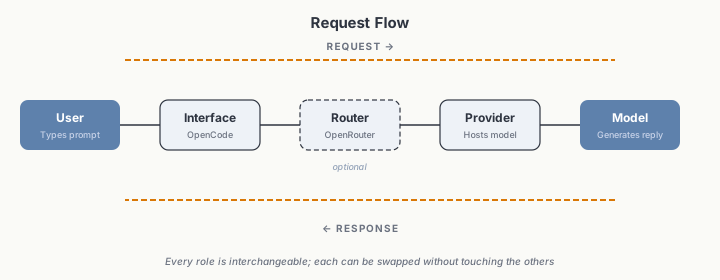
How a request flows from interface through router to provider and developer.
Anthropic and OpenAI are developers and providers of their respective models while also providing the interfaces used to access them. While this is convenient it does limit flexibility and puts us at the mercy of these companies as they have the power to always change every aspect of it, from model to interface. At the same time, ChatGPT and Claude are among the more expensive model providers. Fortunately, there are alternatives. Many AI models, whether proprietary (closed-weight) or open-weight, are available through different providers and can also be accessed via a model router. With these terminologies cleared I shall outline each role in more detail and go into some of the options we have.
Developers
At the time of writing this, notable developers of AI models are OpenAI, Anthropic, Google, and Meta. Of these the two most known ones are OpenAI and Anthropic as they developed the leading frontier models GPT and Claude. Often any other models are compared to these two with the question of: But is this model as good as ChatGPT/Claude? In a way they have become what Windows and macOS are to operating systems, the two options everyone knows and most people don’t venture past. This analogy also aligns with a further difference in that ChatGPT and Claude are proprietary models (closed-weight) while other model developers such as DeepSeek also provide their models as open-weights, the free software equivalent for language models. Although mind you, they aren’t open source. Open-weight means that only the trained model weights are publicly available, the training data, training code, and methodology usually stay proprietary. True open source would need all of those under a permissive license. While OpenAI and Anthropic still have an edge, open-weight models are catching up. DeepSeek deserves special attention here as their models are drastically cheaper than GPT and Claude while being open-weight, widely available across providers, and suitable for our line of work, capable of handling academic research tasks such as literature synthesis and argument checking.
Providers
Providers are the entities hosting AI models on their infrastructure and here we again see a difference in the availability between the models developed as closed-weight models and the open-weight models. For the closed-weight models such as GPT or Claude we can only access these directly through their developers (here they are also acting as providers) or through the infrastructure of hyperscalers (large cloud computing providers) like Amazon or Microsoft that charge Anthropic and OpenAI what Yanis Varoufakis calls technofeudal rent to host and provide these models to their customers. This does not allow for much competition on pricing. This situation is drastically different when considering open-weight models. Let’s take the example of the model DeepSeek V4 Flash. This model is open-weight and licensed under the MIT license. That means anyone can take this model, run it on their own infrastructure, and compete on the pricing under which they make this model available to their clients. Beyond pricing competition, open-weight models under permissive licenses also enable other use cases such as hosting models within a specific jurisdiction with stronger data protection rules (e.g. within Europe), or running them entirely on infrastructure you control where no external party has access to your data, or just ensuring that models cannot be restricted to only certain users by governments, like the access restrictions placed on Fable 5 in the US and might also happen with Chinese-developed models. Additionally, in our line of work, our universities could (and should) be hosting open-weight models on their infrastructure and provide us as academics and their students unlimited free access to these models.
Routers
As there is a huge range of models available by various providers the question becomes which model to choose (I cover that in more detail later) and from which provider. As the field of AI is rapidly changing our choice of model will sometimes change and with that also who provides this model. While just buying a ChatGPT or Claude subscription is convenient, this is limited to the models they provide. Think of a ChatGPT or Claude subscription like having a library card that only lets you read APA journals. They are excellent within that collection, but you can’t access anything else. Instead I argue for the use of a model router, which is like having access to the full library catalogue: you can browse any publisher, any discipline, and pick exactly what you need for each task. A well known example is OpenRouter but there are other options such as Venice.ai, which hosts open-weight models itself and routes requests to closed-weight models. While model routers were originally developed as fallbacks in AI assistant operation for when a model is not currently available to route to another model or the same model by a different provider, a use case that is less relevant for us, they come with other upsides. These are pricing and flexibility. When using a router it can automatically route your request to the cheapest model provider available at the moment and thus save you money and/or only route to providers who don’t retain any of your data. Additionally, it comes with a great deal of flexibility. Imagine a new AI developer publishes a great new model and you want to try it. One way to go about that would be to create an account with that developer and then pay them for access. The alternative is to stick to your router with which you’re already holding an account and credit. One account one bill, regardless of how often you switch between the models provided, who is hosting them, or who developed them.
Interfaces
This brings us to the choice of interface. Well known interfaces are the web or desktop interfaces for ChatGPT and Claude, but there is a wide range of other interfaces for models. We can distinguish between purpose-built interfaces, like the Claude app, and integrations into existing programs, like an IDE (integrated development environment, a code editor) or a note-taking app such as Obsidian. For the purpose of this blog series I will write about purpose-built interfaces, but integrated interfaces can be very useful as well. Interfaces you might have read about are Claude Code, Claude Desktop, Claude Cowork, and a recent addition being Claude Science. These are the proprietary tools from Anthropic and OpenAI has released similar tools with Codex and ChatGPT Desktop. The open source community has developed some equivalently useful tools such as OpenCode (the Claude Code and Codex equivalent), Open Cowork (inspired by Claude Cowork) or goose (a general-purpose AI agent). The choice of interface is up to you, though it should of course be compatible with the model provider, and possibly router you’ve chosen. Another aspect to keep in mind is the intended purpose of each interface. Interfaces like Claude Code, Codex, and OpenCode are designed for software development and work well for a text-based approach. Tools like Claude Cowork or Open Cowork have built-in capabilities for tasks like generating PowerPoint slides. Think about what you will mostly be doing before choosing. In my case, I use OpenCode (and will base the rest of this series on this choice) which is compatible with OpenRouter (which I’m also using). Furthermore, the interface you choose should also support the Model Context Protocol so that you can connect the tools you’ll need.
Choice of Model
With provider (or maybe router) and interface in place the next choice that needs to be made is which model to use. This is not an easy choice and the choice made will depend on the intended tasks, as such it is more of a choice of multiple models and this section is only intended to enable you to make an informed choice. So then what to base the choice of model on? Two things to consider upfront: modalities and context window.
First, what can the model even process? For most of our work the two main input modalities are text and images. But models vary, some are text-only (like DeepSeek V4 Flash), others handle images, audio, or video (like Gemini 3.5 Flash). If you want your AI to work with graphs or screenshots, you need a multimodal model. If you’re working purely in text, you can save money with a text-only model. Second, the context window, how much text the model can handle at once. Measured in tokens (the basic units of text that a model processes, roughly equivalent to a word or part of a word), this determines whether a model can process an entire paper, a full codebase, or a long conversation. If your work involves long documents, this will be a deciding factor.
The easy choice is to go with Claude or ChatGPT, or maybe Gemini. A bit more informed choice would be to base this choice on AI benchmark rankings. From these, claims are made such as “this model is best for writing” or “this model is best for programming”. But, all of these benchmarks are based on contrived tasks and do not mean that a model will work for your use case. Instead, I recommend that you develop your own evaluation use case. For instance, someone is using the task of asking the models to generate an SVG of a pelican riding a bicycle. Mine is that I give it a few pages of my writing and ask it to verify each and every claim I make against the sources I am citing to support each claim. I then evaluate the AI’s output and judge whether I’m happy with the expected performance.
If you’re looking for a recommendation, I am currently using DeepSeek V4 Flash as a daily driver and DeepSeek V4 Pro or GLM 5.2 if it is a more reasoning intense task, such as checking the argument flow in my writing.
Tools
To borrow a metaphor from the Google whitepaper on AI agents, the model is referred to as the brain and that’s what we have been covering above. In the next steps we’re going to cover the tools, or to stick with the metaphor, the hands. Depending on the choices you made in the above setup some tools might already be available as some interfaces already come with tools. For instance, OpenCode comes with tools for editing local files, fetching content from the web, and asking the user questions, but which tools are available can be extended. For providing tools to the AI assistant there are two main ways, the Model Context Protocol (MCP) and Agent Skills. There is quite some debate going on over which ones are better, that I won’t get into, but you might want to read about if you’re interested (see also the Posit blog).
Model Context Protocol
The Model Context Protocol (MCP) is a standard for integrating external software into an AI assistant. This is the standard we will be relying on to integrate our sources of information into the AI assistant. An MCP can be connected to from an AI assistant either via a local connection or a web connection to an external server. When possible local connections are to be preferred as a remote connection to a server comes with a certain level of risk: the provider can change the tools available through the MCP without you being notified. Imagine your Zotero search suddenly stops working mid-project because the server operator pushed an update. A locally installed MCP avoids this dependency (read more about this in the Agent Tools & Interoperability with MCP whitepaper). Also, not for everything an MCP is available, that is where agent skills come in.
Agent Skills
Agent Skills are a lightweight, open format for packaging specialised knowledge and workflows. A skill is a folder containing a SKILL.md file, metadata in its frontmatter (name, description), plus step-by-step instructions, along with optional scripts, templates, and reference materials. AI assistants use progressive disclosure which means that at startup, they load only each skill’s name and description and will only load the full instructions when a task matches the skills name and description. This lets AI assistants carry many skills with minimal context overhead, unlike MCPs whose tools are all fully loaded during startup.
Practical Implementations for our Setup
Now, I know that the above is a lot of content to cover but I believe that content needed to be covered to enable you to make an informed choice of how you want to set up your own AI assistant.
In the previous post we set up citekeys to match Zotero entries to Obsidian notes. The MCP connections below add a second layer: semantic search across your entire library using embeddings, which capture meaning rather than just keywords. Together, citekeys give you precise matching between specific sources and notes, while embeddings let the AI discover sources and notes.
Zotero -> AI
For integrating Zotero into our AI assistant an MCP is available. This MCP works by connecting to Zotero using the local Zotero API. Based on this access to Zotero the MCP software creates a database to index all sources in Zotero, including the full texts of sources if they are stored in Zotero. The text is extracted from those PDFs and turned into embeddings, representations that capture meaning, not just keywords. This means the AI can semantically search your entire library and enables you to ask things like “find papers about the relationship between mind wandering and metacognition” and it will find relevant papers even if none of them use those exact phrases.
Should you happen to use EndNote, there is an MCP available for your use case, and the same applies to Mendeley.
Obsidian -> AI
Connecting Obsidian into our AI assistant works similarly to how Zotero was connected, by MCP. However, to be able to do that we first need to install a plugin for Obsidian, Smart Connections (the developer recently started selling a Pro version that is not needed for our case). This plugin creates embeddings based on the entire content of your vault, similar to how the Zotero embeddings were created. These embeddings can then also be connected into our AI setup using an MCP. That means you can ask the AI things like “find notes about self-regulated learning” and it returns related results even if those exact words never appear. There are multiple options for Obsidian MCPs based on the Smart Connections plugin. Which exact option to use depends on your use case. The one I am using is smart-connections-mcp. However, they only give the AI assistant the ability to search through your notes, not edit them. For this purpose we will be using, in addition to the MCP, a set of agent skills for Obsidian that give the AI the ability to interact with the Obsidian vault. So that in combination your AI assistant will be able to search through your vault but also to make changes to it.
Should you use other note taking tools there also are options available, such as an MCP for Logseq, an MCP for Joplin, and even one for OneNote.
Search -> AI
Lastly, in addition to the connections to Obsidian and Zotero we need one more MCP, for searching the internet. When thinking about searching the internet the first thing that usually comes to people’s mind is Google. However, Google’s search results have degraded significantly in recent years, increasingly dominated by ads and SEO-optimised content rather than relevant information. There are alternative search providers, some specific for usage by AI, such as Exa or Firecrawl. While using Exa, Firecrawl or alternatives is an option, I personally prefer, and recommend, Kagi. Kagi is a subscription service that provides no-nonsense search of higher quality than other providers do, for both you and your AI assistant. Kagi, or other search providers, can also be added to our AI assistant using the Kagi MCP, Exa MCP, Firecrawl MCP or a similar integration for the search provider you prefer.
Next Steps
The next step is for you to choose which route you’re going to take. The point of this series is to enable you to set up your own AI assistant and that starts by making choices about the content covered above. How do you want to access the models you’re using? Do you want to use a router? Do you have requirements about the provider (e.g. location or data storage)? Which interface do you want to use? I recommend you start with what you’re already using and evaluate if it is still suitable for your purpose and workflow. That will give you a starting point.
If you’re looking for a recommendation, I am using OpenRouter to access models only from providers with a zero-retention policy (meaning the provider does not store your inputs or outputs after the request is completed). These I access through OpenCode and nowadays I mostly use DeepSeek V4 Flash.
With choices made about how to access models, which model to choose in which interface, and how to connect Obsidian, Zotero, and Kagi, the infrastructure is complete. What remains is the AI assistant’s, for lack of a less anthropomorphic word, personality: its role, its rules, its voice. That is the subject of the next post.