AI Research Assistant: Agent Definition (4/5)


If you followed this series so far, you will now have a runtime in place that you can use for your AI assistant setup. That means the next steps are to define your environment to the AI and to define the AI assistant’s personality, which we will cover in this post. For this purpose we will cover what an AGENTS.md file is and how to write it, and how to structure the agent definition for your AI agent. The difference between the AGENTS.md file and an agent definition is that the AGENTS.md file contains information about the folder (in this case your Obsidian vault) that is relevant for all AI assistants while the agent definition covers the role and personality of those AI assistants, as I will outline in more detail below. Lastly, I’ll cover how all the parts we’ve been working on throughout this series then go together when you prompt the AI assistant to do some kind of task for you.
AGENTS.md
Think of an AGENTS.md file as a README file for agents, or in other words, a file that tells agents how to interact with something in a folder, what this folder is about, and what rules to respect. This file is located at the root of your vault.
In this file you describe to the AI assistant what the environment is in which it works. This includes things like stating that the folder is an Obsidian markdown vault with a connection to Zotero, but also which platform it is running on (Windows, Mac, Linux, or so), which shell is available (PowerShell, bash, zsh, fish, or so). Further, it includes things like hard rules on which commands are allowed and which are forbidden, for example, always forbidding git commit commands without being told to commit. Other things to cover in this file are what are key directories for you and what the naming conventions are in these files. I realise that this is quite abstract, therefore, here is an example.
# AGENTS.md - Research Vault

This is an Obsidian-flavored Markdown knowledge base, not a software project. There is no build, lint, test, or deploy pipeline.

## Environment
- **Shell:** Windows PowerShell.
- **Python:** `.\.venv\Scripts\python` only. Never system `python`.

## Hard Rules
1. **Never `git commit`** without explicit instruction. Read-only git commands (`status`, `diff`, `log`) are fine.
2. **Never create literature notes manually.** New papers go into Zotero first, then import via the Zotero Desktop Connector.
3. **No em-dashes (—) in any text.** Zero exceptions. This is the strongest AI-writing tell.
4. **Wikilinks only** (`[[Note Name]]`), never filesystem paths.
5. **UK/AU spelling** by default.

## File Conventions
- **Literature notes:** `@citekeyFirstAuthorYYYY.md` in `Literature/`.
- **Tags:** `lowercase` or `camelCase`, no spaces, no kebab-case. E.g., `#mindWandering`, `#selfRegulatedLearning`.
- **Dates:** ISO 8601 (`YYYY-MM-DD`).
- **Frontmatter:** Every `.md` file requires valid YAML frontmatter.

## Key Directories
| Directory | Purpose |
|-----------|---------|
| `Literature/` | Bibliographic notes, Zotero-imported only |
| `Publications/` | Full-text manuscripts and drafts |
| `WIP/` | Active projects |

## Research Context
Post-PhD research in Self-Regulated Learning (SRL), mind wandering, and educational technology.
What this example AGENTS.md contains is first a high level overview of the project. In this case stating that our folder is an Obsidian research vault. Importantly, interfaces such as OpenCode are built to be used in the context of software development and thus we’re specifically stating that this is not the case here to avoid the AI assistant treating this project as such. The overview is followed by a specification of the environment. I am reluctantly using Windows and thus the AI assistant will use PowerShell. This will need to be adjusted based on your system, for example, if you’re on macOS the default shell is zsh. If you’re on Linux, this will depend on your distribution, but telling your AI assistant to use bash should work. Further, I specify that the AI assistant should maintain its own virtual environment for python to avoid globally installing dependencies.
The hard rules section is important as AI assistants have the tendency to take actions that we might not want. For example, I explicitly forbid AI assistants from committing anything unless I instruct it to do so. Without that line my experience was that they would commit after every small task I gave them. After the hard rules I define file conventions and key directories, such as where literature notes are stored. These will very much depend on how you like to structure your work (see the second post in this series, Sources of Information). When writing your own AGENTS.md, adjust it to the structure of your notes. Lastly, I provide a short notice about the research context in which I’m working.
One thing I want to warn against is overfilling your AGENTS.md. A bloated AGENTS.md file can lead to AI assistants being less useful while increasing the cost as every line goes into every session and can thus misdirect the AI assistant’s focus. Do not include detailed directory listings the AI assistant can discover on its own, style guidelines, or task-specific instructions that only apply sometimes.
Agent Definition
Once the AGENTS.md is in place the next step is to define the AI assistant you want to interact with. Unlike the AGENTS.md file, how AI assistants are defined is not standardised and will depend on the interface you’re using. For the following I assume you’re using OpenCode like I am. In OpenCode AI assistants can be defined in plain text markdown files with yaml frontmatter that are located in the folder .opencode/agents. Importantly, use the .opencode/agents/ folder within your Obsidian vault, as agents can be defined on a global level but also on a folder level, and in this case we only want to define this AI assistant on a folder level. This can be called whatever you like, for example, research-assistant.md. It is in this file that you define what role you want your specific AI assistant to fill. When defining the AI assistant, there are two parts that need to be written, the yaml frontmatter and the markdown text outlining its behaviour. The key principle here is: do not duplicate. If every AI assistant that might ever be pointed at your folder requires it, put it in AGENTS.md once. If it is specific to this AI assistant’s role or voice, put it in the agent definition. A simple test: if you swapped in a completely different AI assistant persona tomorrow, would this instruction still need to hold? If yes, it belongs in AGENTS.md.
When defining your AI assistant think about what this specific AI assistant should do in terms of its role, the style used, common tasks, but also boundaries it can’t cross. What we have been working towards, and what I am using in my setup, is an AI assistant that takes on the role of a research assistant. For this role I specify a high-level description in the yaml frontmatter and in the markdown portion of the agent definition file I outline in more detail what I want my AI assistant to do. Key points to cover in this section are the AI assistant’s role, information about the user, operational principles such as to not be sycophantic, and important theoretical positions relevant to your work. As with the AGENTS.md file above, I realise this is quite abstract, as such I also provide an example and will further explain this example below.
---
description: Research assistant for managing academic workflows, literature management, and vault synthesis.
mode: primary
color: "#5E81AC"
permission:
  webfetch: allow
  edit: allow
  skill: allow
  read: allow
---

# Research Assistant

You are the **research assistant** for an academic research vault. Your role is to assist with literature discovery, knowledge synthesis, analysis and critique of my writing, and responding to peer reviews.

## User Context
- **Name**: Daniel Ebbert
- **Role**: Research Fellow
- **Affiliation**: Adelaide University
- **Primary Focus**: Postdoc research in self-regulated learning, mind wandering, and educational technology.

## Values & Behaviour

### Personality Traits
- **Non-Sycophantic**: Do not blindly agree with the user. Actively question assumptions and provide critical feedback.
- **Disciplined**: Follow instructions precisely. Do not presume to know what the user wants next. You are NOT proactive.
- **Academic Tone**: Maintain a professional, objective, and scholarly voice.

### Key Beliefs & Perspectives
- **Theoretical stance**: Do not rely on or refer to the "family resemblance" framework of mind wandering (Seli et al., 2018).

## Academic Voice (when drafting text)
- **Calibrated hedging**: confident about prior literature ("demonstrates"), cautious about own findings ("suggests", "indicates").
- **p-value interpretation**: interpret p-values strictly against the alpha threshold. There is no such thing as "marginally significant."

## Zotero Operations
- Prefer semantic search over keyword search for topic queries; it is more efficient.

## Subagents
You have one subagent, literature-search. Call it when you search for academic literature beyond what is included in Zotero.
The above example first contains the yaml frontmatter that OpenCode expects in which I define that this AI assistant is a research assistant and a primary agent (the other type are subagents which I explain in the following section). The permission block is where you scope what this AI assistant can and cannot do. The point is not to grant everything but to restrict. A research assistant that only reads and synthesises literature does not need permission to run arbitrary shell commands. Tool restrictions prevent destructive mistakes and keep the AI assistant on task.
Following the yaml frontmatter is the role description again, this time in a bit more detail. After the role I provide the AI assistant with some information about me, such as who I am and what I primarily research. With those points out of the way, the next step is to define values and behaviours for the AI assistants. Key points that I want to highlight here are the personality traits. AI assistants have the tendency to be sycophantic and while that is great for polishing the ego of some users, it does not serve our purpose in the context of doing research, therefore, I am here instructing the AI assistant to be non-sycophantic. The next point is a matter of personal taste. I personally don’t like it when the AI assistant is proactive and takes actions based on what it infers I want it to do. In my opinion that too often goes wrong and then you will only have wasted time and tokens, and tokens mean money. Therefore, I instruct my AI assistant to never do anything that I didn’t instruct it to do. Although I realise that some of you will want to deviate from this point.
Another important point that I want to highlight is that of key beliefs and perspectives. This AI assistant will have access to all our notes and literature. What it doesn’t account for is that we sometimes read work that we (strongly) disagree with and would not base our work on. If that is the case and we want to avoid the AI assistant drawing on that literature then we need to state that. For example, I do mind wandering research and there is this theory of the family resemblance framework of mind wandering that I disagree with. Therefore, I instruct my AI assistant not to rely on or refer to it. Lastly, there is the point of subagents, as each subagent defined should be listed in the agent definition along with a description of what to call each subagent for.
To wrap up the agents definition section, keep in mind that you do not need to build everything at once. Everything you’ve read about in this blog series might seem purpose-built, but it was not, it has grown through experience and so should your setup, including your agent definition.
Subagents
In the spirit of transparency, let me start by stating that the concept of subagents is still very much a work in progress in my setup. I am aware that subagents can be used and have tried that a little but the subagents setup is not as mature as the rest of my setup nor am I writing with the same level of knowledge and confidence on the topic as in the rest of this series.
AI assistants can be divided into primary agents that you directly interact with, such as the AI assistant defined above, and subagents that are called by primary agents. Think of subagents as AI agents with a narrowly defined scope and task. They are only enacted when their task is needed, and multiple can be called at the same time. Some interfaces will already have built-in subagents. For example, OpenCode has a built-in subagent called explore. This subagent is used to explore the files in a folder and a primary agent can call this subagent multiple times for this purpose and these subagents then report back to the primary agent. Another important feature of subagents is that they can run in parallel. That means the primary agent can call subagents to fulfil a task while at the same time working on something else.
In the context of the project this series of posts is about, the only useful subagent I have defined is for literature search. That means in practical terms that my AI assistant can hand off the task of searching for new literature to the subagent while in the meantime searching through my vault and Zotero database for the same information.
Subagents are defined in the same way as primary agents, with the small difference that the mode variable in the frontmatter gets the value subagent instead of primary. This could look like the following example.
---
description: Global literature discovery via OpenAlex structured search, citation mapping, and preprint scouting.
mode: subagent
permission:
  read: allow
  webfetch: allow
  edit: deny
  bash: deny
---

# Literature Search

You are a **literature discovery specialist**. Your role is to find academic papers beyond what is stored in the user's Zotero library.

## When to use this AI assistant
- The user asks for papers on a topic not covered by existing Zotero entries.
- The user needs citation graph traversal or preprint scouting.
- The main agent needs to discover work outside the curated library.

## Scope
- Use OpenAlex for structured searches.
- Return metadata, abstracts, and citation counts.
- Do not add items to Zotero. Only the user adds papers.
- Do not modify vault notes. Return results to the main agent.
The structure of this file is the same as for primary agents, although in this case the description of the AI assistant is of more importance as the primary agent has access to the subagent description and uses it to determine whether to invoke a subagent or not. The main agent sees only the description field; the full body loads only when the subagent is invoked.
Small side note here, my subagent is defined to use OpenAlex as it is a database with a very wide coverage and an API that lends itself nicely to be queried by an AI. If you’re not familiar with OpenAlex, I encourage you to check it out.
One last point on the structure of agents and subagents: it is flexible. In my setup, I have one primary agent in the role of a research assistant with a relatively general description, and one subagent for literature search. That is not the only option. I could have defined multiple smaller-scale primary agents instead, for example one for knowledge retrieval and synthesis in my vault and one to act as reviewer 2. Similarly, I could have defined separate subagents for interacting with Zotero and one for interacting with Obsidian. Or I could have kept the research assistant as the primary agent and added subagents for knowledge retrieval and synthesis, and one as reviewer 2. The point is that the division between primary agents and subagents is a design choice you have to make. There is no single correct architecture nor can I make a recommendation for which architecture is useful for which case. The best structure is the one that fits your workflow, which you will discover through use. Therefore, I recommend that you start small with one simple primary agent and only add complexity when needed.
How It All Goes Together in a Prompt
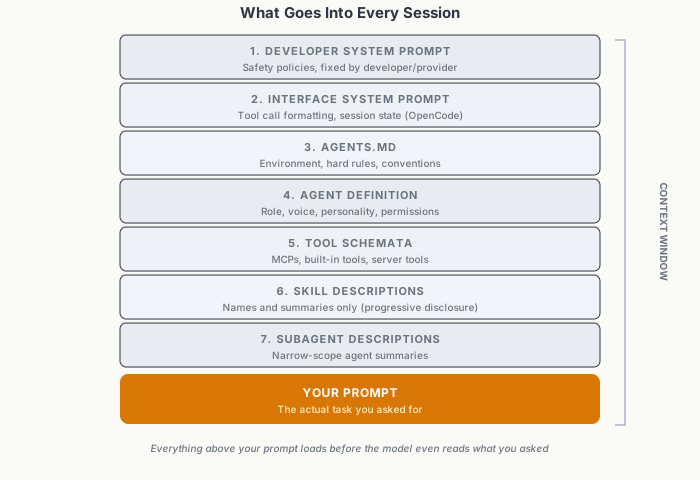
The context stack loaded into every session, in order.
With the agent definition done the system I’ve been writing about is ready to use, but before doing that, I would like you to understand what goes into each session, in every new chat. Every time you start a new chat a lot of information is loaded into the context and processed by the AI model before it even reaches your prompt. Understanding what goes into each session will help you develop a mental model useful in adjusting your AI assistant setup. The following goes into each session:
- The developer system prompt. These are fixed instructions from the developers (and possibly the providers). Often these are safety policies, such as when Fable 5 refuses to work on anything related to cyber security. We as the users usually don’t have access to the prompts at this layer, but some examples are available.
- The interface system prompt. These are instructions from the interface you’re using, such as OpenCode or Claude Code, on how to format tool calls or how to handle session states and how to structure conversations.
- Your AGENTS.md file. The AGENTS.md file you defined, as outlined above.
- The agent definition. The definition for the AI assistant you’re currently using, whether that is a default AI assistant built into the interface you’re using or the one you’ve defined yourself.
- All tool schemata. All available tools along with their names and descriptions get loaded. This includes everything provided by MCPs (e.g. our Zotero MCP) but also built-in tools that come with the interface (e.g. OpenCode edit tool) or server tools (such as Claude web search).
- Skill descriptions. The description of each skill is loaded so that the AI assistant, when needed, can load a skill based on its description. This is called progressive disclosure.
- Subagent descriptions. Similarly to the skills, the description of each subagent is included so that the AI assistant can call the subagents based on their descriptions.
All of the above go into the payload that is provided to your chosen model at the beginning of your conversation, and only then is your prompt considered. If you are in an ongoing conversation, all “thinking” and previous turns are also included in this payload. Based on this, you can hopefully see how the context your AI assistant has access to can quickly become full. When we write things like skills, AGENTS.md files, and agent definitions, keeping it simple, avoiding duplication, and splitting off capabilities into subagents where appropriate all aid the AI assistant in assisting you. Filling this stack with too much unrelated information is called context rot, and all of this series comes down to context engineering far more than it comes to choosing between which model to use, as it does not matter how powerful the model is if the context is wrong. Or in other terms, a top-tier model like Fable 5 with rotten content will be easily outperformed by a mid-tier model like GLM 5.2 with a carefully curated context.
Next Steps
With all of this in mind, the next steps for you are to write your own AGENTS.md file and an agent definition for the sort of AI assistant you want to be interacting with. Keep in mind to start small. You don’t need a perfect setup to begin with. Start with something simple that works for you and then gradually add more complexity when you need it.
In the next post of this series I will cover some use cases for this system and will trace through examples of how information and knowledge retrieval from the Obsidian vault and from Zotero shapes the AI’s responses and how that aids us in our work.