AI Research Assistant: An Overview (1/5)


Over the last few months (or, in a way, years) I’ve been working on my local setup for using AI to assist me in my research. I have shown this setup to a few colleagues and they have asked me to write about it and provide workshops on how to recreate such an AI research assistant for themselves. As such, I am writing this series of blog posts to structure my thinking, document my setup, but also to point future workshop participants to it as a resource. This series is written for researchers who are open to using AI to assist them in their work. While a similar setup could be used for other purposes, such as teaching, this is not what it was designed for. Some basic IT familiarity is required, such as installing software from GitHub, but everything can be put together by following the instructions provided with each piece of software. This post serves as an overview of my setup and the blog post series. This project has been inspired by other projects, notably the Claude Scholar project by Gaorui Zhang and the Scientific Agent Skills by K-Dense. Neither project fit my workflow and both are, in my opinion, too complex as they are aiming to achieve too much in one project. This led me to building my own setup.
There are two main aspects to this work, Personal Knowledge Management (PKM) and AI, and I maintain that AI only becomes really powerful when based on PKM. Without the required knowledge about your work any AI system is only as good as its training data. Or in other words, any AI is only ever as good as the information it has available. Garbage in, garbage out. This is also called context engineering (the practice of curating what information an AI has access to so that its output is grounded in your work rather than its training data alone).
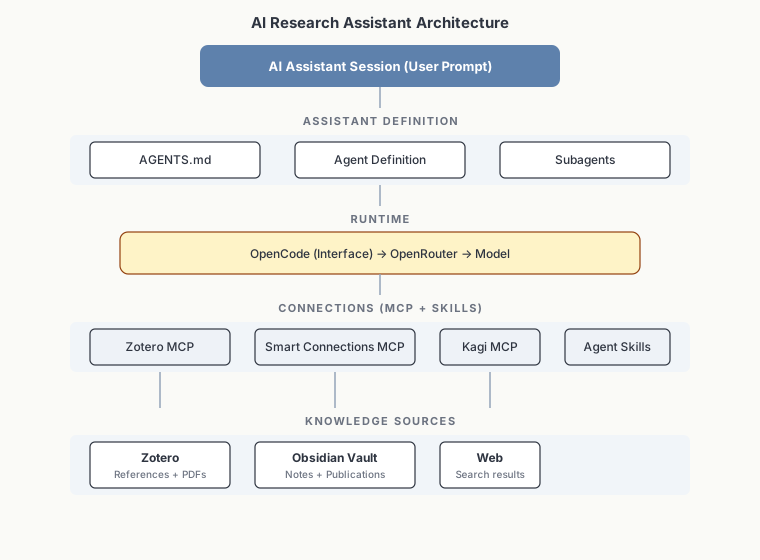
Architecture overview of the AI research assistant setup.
Sources of Information
The second blog post in this series outlines how to set up a basic personal knowledge management system for the purpose of informing any local AI setup while also being helpful to you. When considering what knowledge will be useful when using an AI in the context of research a few things come to mind. Possible candidates are literature databases and scholarly papers. However, these are not who you are and do not carry your point of view. Therefore, the most important source of knowledge are your notes. The crucial aspects of this setup will be that it is machine readable and structured. Example content that I have in my PKM are things like all my publications (including any major versions and reviews), grant applications, reviews I’ve written, notes I’ve taken about literature I’ve read, and notes I took during meetings or conferences. These capture my point of view and enable any AI ingesting these texts to align its answers with my perspective on the content. A beneficial side effect (and in my case the original purpose) of setting up such a PKM is that it not only makes it possible to serve as context for an AI assistant, it also makes it easier for you to retrieve your previous work and notes.
Runtime
With a knowledge base in place we can turn to the third blog post in this series, the specific runtime, or in other words, the software we’ll be using. In this post we will first break down the different roles involved in an AI assistant (developers, providers, routers, and interfaces), then cover how to choose between them and which model to use, and finally how to connect the combination to your knowledge base and other relevant tools we might already be using, such as Zotero, and to web search. This is very much the “how” of putting all the pieces together, but mind you, without all the pieces (such as the PKM) in place this setup will be far less useful. I will also further outline that every piece of this setup is interchangeable, we should not be locked into any ecosystem or provider and as such this setup is designed so that every part can be exchanged.
Agent Definition
Once a PKM, or any other machine readable source of knowledge you maintain about your work, is available alongside an implementation for the runtime, the next step is to work on the instructions for any future AI and this will be the topic of the fourth blog post in this series. We will cover the role of an AGENTS.md file and how this is different from an agent definition. This enables us to define in your local setup which role you want your AI assistant(s) to fill. This agent definition can be supplemented by subagents specific to your use case. The important part here is that you define what you need based on your workflow and to ensure that it is your use case that drives this process. I will also cover how all of these pieces come together in each session when you prompt the AI assistant.
Use Cases
Lastly, in the fifth blog post, I will cover some use cases that have been useful to me and trace how pieces of information flowed from knowledge base or tool to inform the AI generated answer. Further I will cover some temptations worth resisting when it comes to responsible and ethical use of AI in academic work. Finally, I will outline some directions I am considering for future development.
Takeaway
The take away for you as the reader I am aiming for is not a detailed guide of how you can set up the exact same system I am using, the goal is to get you to think through which parts you need and fit into your workflow. Maybe you use a different reference manager or your institution provides you with a local AI system (lucky you). Either way, after reading this series you should be able to make an informed decision of how to structure your knowledge base so that it works for you and an AI and to identify which integrations to set up to connect your knowledge sources to your preferred model.